Ditch the generic PDF apps and get an App for Stage Managers made by Stage Managers.
A professional digital prompt book for theatre stage managers. Import PDF scripts, annotate with cues and blocking, draw with S Pen, and run shows with live cue-calling.
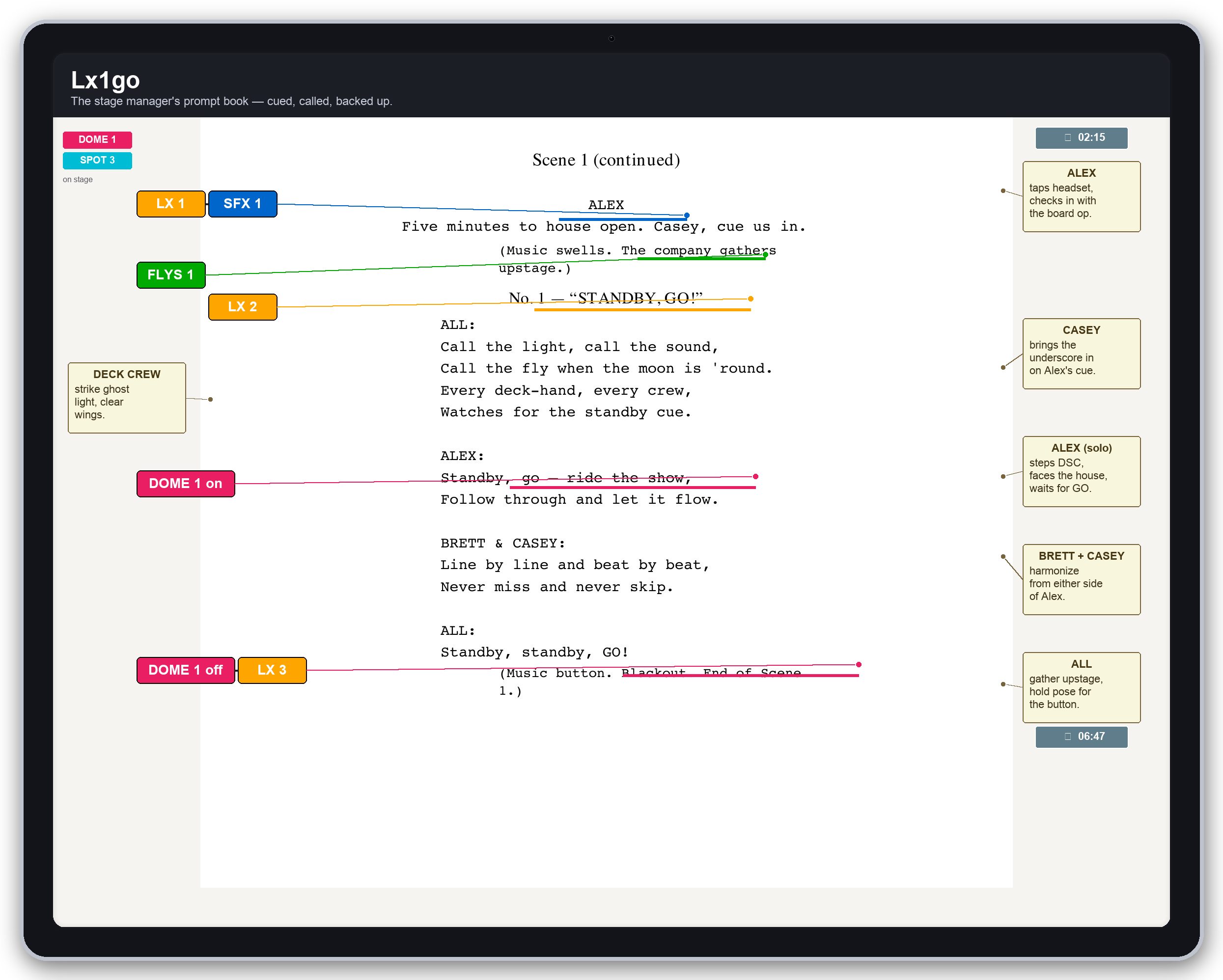
Powerful Features for Stage Managers
Everything you need to run a professional production
PDF Script Import
Import any PDF script — scanned or born-digital, any length. Search works across the whole book from the moment it lands.
Custom Cue Categories
Fourteen built-in categories (LX, SFX, VID, FLYS, PYRO, AV, SPOT, MIC, HAZE, PROJ, RIG, HOUSE, COMM, TAB), each with its own colour, per-category fields, and independent numbering. Hide the ones your venue doesn’t use, rename any, or add your own custom category with a colour of your choice. Labels auto-increment, and out-of-sequence placements are offered a point cue (1.5) automatically.
Draw & Highlight
Freehand pen, highlighter, straight lines, and shapes. Draw naturally with any tablet stylus — pressure sensitivity varies stroke width on pens that support it. Mark blocking, circle dialogue, whiteout deleted lines.
Show Mode Cue Calling
Dedicated full-screen interface for live performances. Color-coded cue states (Standby, Go, Complete) visible in low light.
Smart Page Cleanup
Lift coffee stains, shadows, and photocopier grey off scanned pages. A live preview and aggressiveness slider let you whiten hard or keep faint pencil marks. Revert restores the original at any time.
The Cue List
Every cue in the show in page order — label, colour, the line it rides on, and page number. Filter by category and tap to jump. Your paperwork view at the production desk.
Full-Text Search
Matches on the current page highlight as you type. Press Enter for a whole-script result list — every page is indexed at import, including scanned PDFs.
100% Offline
All data stored locally on-device. No internet, cloud account, or subscription required. Lx1go snapshots each show the first time you edit it on any given day.
Composed Blocking
Build blocking notes from buttons, not the keyboard. Modifier chips (Enter, Exit, Cross, Sit, Rise, To) plus a 3×5 stage map with whole-region edge buttons. Every label is customisable in Settings — pick an OP or SL template, then override or blank any button.
Page Management
A thumbnail grid of the whole book: duplicate, delete, reorder by drag, insert blank pages, and split a script into Act 1 and Act 2. Append revised scenes from a PDF or the document scanner.
Bookmarks & Zoom Memory
A page indicator bar marks which pages carry cues and which are bookmarked. Your working zoom carries across pages and is remembered per show — and any page can pin its own framing.
Export, Import & Backup
Share a whole prompt book as one .lx1 file, with pages, mark-up and styles, to hand over to a deputy or move tablets. Back up every show at once to an encrypted .lx1 file before production week.
Fly State
A dedicated screen that walks every FLY cue in show order and shows each line's state (In, Out, Dead, Reset, Trim) at any cue you pick — so you can answer "what's in the air right now?" without flipping pages.
Scene Photos
Attach reference photos to any page — set shots, props layouts, or a photo of the actual scene — from camera or gallery, each with its own caption.
PDF Export
Export a whole show or a page range as a PDF with all your annotations baked in. Cue-sheet pages are appended automatically — one per category (LX, SFX, FLY…) — ready for the production desk.
Cue Groups
Pick two or more cues with the Group button to stack them into one row sharing a single connecting line, or extend the row from the Add Cue panel with one tap. Members fire together on a single GO — ideal for LX 2 + SPOT 1 + SFX 3 on the same take.
Page Notes
A per-page notes strip for reminders, decisions, and questions for tomorrow's rehearsal. Notes travel into PDF exports above the page image so nothing gets lost.
Spot Pairing
Give each follow-spot cue an on, off, or X (crossover to another operator) state. Every page a spot is active shows a coloured pill above the page. A pairing audit sheet flags any dangling ‘on’ before curtain, and the trail bakes into the exported PDF.
Fly Line Library
Manage the show’s fly plot in one place: number, name, piece per line. FLY cues pick a line from the library instead of retyping it, so a rename in the plot updates every cue that uses it.
Gel Library & Colour Picker
The LX channel table uses the show’s Gel library or a multi-mode colour picker (Gel / RGB / HSI / CCT) with numeric precision so designer values from the paperwork round-trip exactly. Intensity writes to the sibling column atomically.
Automatic Daily Versions
Every day you open a show, Lx1go tucks yesterday’s copy safely aside. Something wrong with tonight’s edit? Roll back to any day of rehearsals without losing a page.
How It Works
From script to showtime in three simple steps
Import Your Script
Upload any PDF script and watch it convert to high-resolution images in seconds. Name your show and choose your terminology preferences.
Annotate & Prepare
Add cues, blocking notes, highlights, and drawings. Use the S Pen for natural annotations and create custom categories for your production needs.
Call Your Show
Enter show mode for live performance. Track cue states with color coding, monitor show timing, and navigate with confidence in the dark.
Professional Annotation Tools
Every tool you need for script preparation
Highlighter
Saved colour, width, and opacity presets you define once
Blocking
3×5 stage map with fully customisable labels (OP or SL templates)
Timestamps
Capture elapsed time from the running show timer
Text Annotations
Custom fonts, sizes, colors, and backgrounds
Straight Lines
Solid, dashed, dotted with arrow endpoints
Shapes
Rectangles, circles, triangles, diamonds, stars, hexagons
Eraser
Erases whole strokes — or hold the S Pen barrel button
Reusable Styles
Define once, apply everywhere with live updates
Pressure Pen
Freehand ink with S Pen pressure-sensitive width
Whiteout
Mask cut lines in the page background colour
30-Step Undo
Every placement, move, draw, and clear is reversible
Connecting Lines
Straight or curved, per element, with opacity control
Read the Manual
Every screen, panel and gesture, in the order you work through a production
Simple, Transparent Pricing
Start with the app. Add Pro when your production needs it.
Lx1go
Production Pass
90 days
Pro features for the run of one production, from rehearsals to closing night.
Pro
Technical Specifications
Built for performance and reliability
Target Device
Samsung Galaxy Tab S10 Ultra with S Pen
Input Model
One finger or S Pen for the active tool
Two fingers always pan and zoom
Privacy
100% local storage
No network dependency
Show Mode
Full-screen script, no edit tools
Screen wake lock held all run
Ready to Transform Your Stage Management?
Join professional stage managers using Lx1go to run their shows with confidence.