Settings
Settings have their own tab in the Setup screen. Open Setup from Setup , the last item in the edit screen’s ⋮ menu, or from Setup in the Tools panel, then pick the Settings tab. Each show has its own settings, and changes save as you make them.
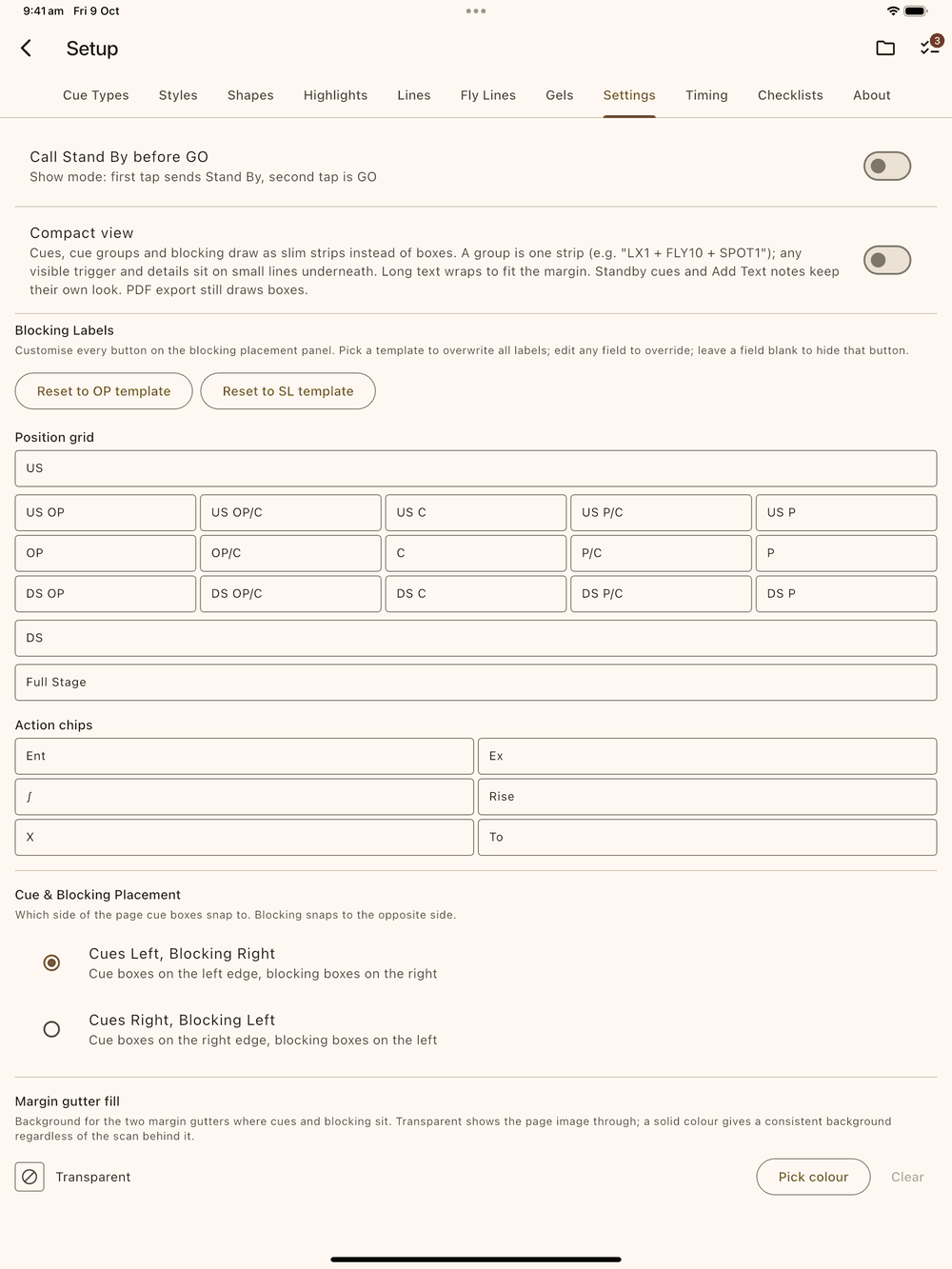
The Settings tab has no reset-to-defaults button; use the template buttons below to put the blocking labels back.
Call Stand By before GO
Off by default: in Show Mode the first tap on a cue calls GO. Turn it on and the first tap calls Stand By and the second tap is GO. While Crew link is running this switch is locked on, because crew need the Stand By before each GO.
Blocking labels
The Add Blocking panel (the popup that opens when you tap Add
Blocking ) has a 3×5 position grid (three rows of five), an upstage
button above it, downstage and full-stage buttons below it, and six action chips (Enter, Exit,
Sit, Rise, Cross, To). Every one of those buttons is a text field you
can rename. The defaults are US, DS and Full Stage for the
row buttons and Ent, Ex, ∫, Rise, X and To for the chips.
- Pick a template. The two buttons at the top (Reset to OP
template and Reset to SL template) overwrite every label with
that template’s defaults. OP uses
OPandPfor the sides,Cfor centre, and adds the intermediateOP/CandP/Ccolumns. SL usesSRandSLfor the sides with the same intermediate columns. - Change any label: tap a field and type. Changes save when the field loses focus. Open the blocking panel to see them.
- Clear a field to hide that position or action button in the panel. Clear the whole action row if you only want positions, or clear the intermediate columns for a plain 3×3 grid.
A new show starts with the template matching the Stage Terminology you chose when importing the script (Prompt/OP or Stage Left/Right). Change it any time here.
Cue & Blocking placement
Pick which page edge cues and blocking snap to:
- Cues Left, Blocking Right (default)
- Cues Right, Blocking Left
Boxes hug the text column on whichever side they’re given (on the left their right edge sits on the Left axis, on the right their left edge sits on the Right axis; see Axes). Their connecting lines reach back to the anchor point in the text. Time stamps go on the blocking side unless you place them in the other margin (see Text & Timestamps).
Compact view
Turn this on to draw cues, cue groups and blocking as slim strips instead of boxes. It takes up less of the margin, so a busy page is easier to read at a glance.
- A cue shows as a dark strip with its name in its cue colour.
- A cue group is one strip, for example LX 1 + FLY 10 + SPOT 1.
- Blocking shows its words in its own text colour.
- If a cue’s trigger or details are switched to Visible, they go on small lines under the strip.
- Long text wraps onto more lines to fit the margin. Nothing is cut off and nothing runs into the script.
Standby cues, Add Text notes and time stamps look the same as before, and PDF exports and thumbnails still show boxes. Compact view only changes how things are drawn, so you can switch it on and off as often as you like. See Compact view on the Cues page and Blocking for more.
Margin gutter fill
The two margin gutters, where cues and blocking sit, are transparent by default so the page image shows through. Tap Pick colour to fill them with a solid colour instead, so your cues sit on the same background however the scan looks. Clear makes them transparent again.